
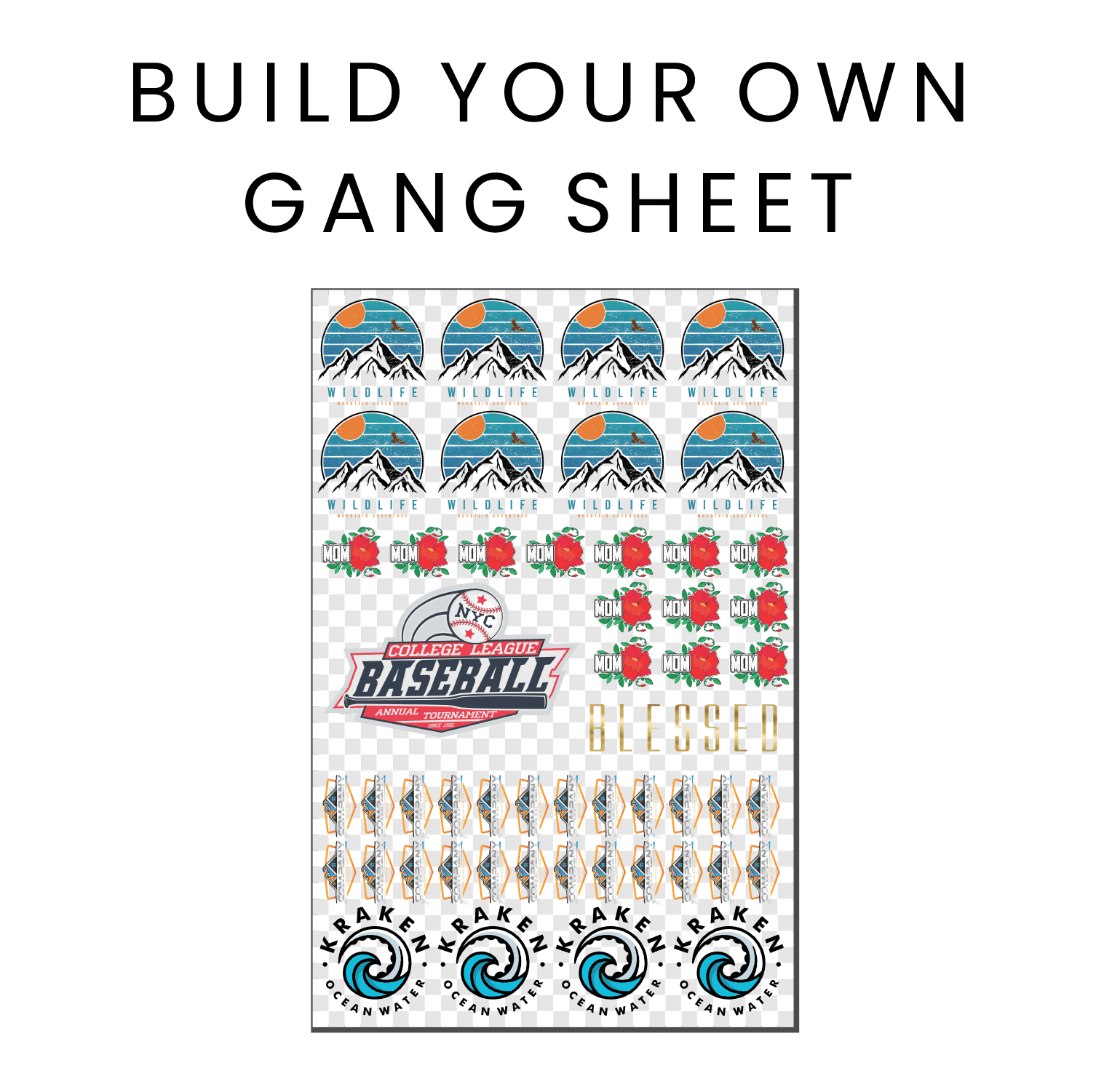
In the exciting world of custom apparel, the DTF Gangsheet Builder stands out as a pivotal tool for creators and entrepreneurs alike. This innovative solution simplifies the process of arranging multiple designs on a single DTF (Direct to Film) sheet, enabling efficient printing that saves both time and material costs. With DTF printing rapidly gaining popularity among beginners and seasoned professionals, mastering how to create gang sheets has become essential. Our comprehensive guide will explore the features, best practices, and tips on DTF print settings, ensuring you are well-equipped to dive into this vibrant printing technique. Whether you're looking to elevate your small business or hone your crafting skills, understanding the DTF Gangsheet Builder is your first step towards success in the fabric printing landscape.
When it comes to custom printing solutions, the concept of a gangsheet creator is one that transforms how designs are managed and printed onto fabric. This powerful tool not only optimizes the use of DTF film but also enhances productivity by allowing multiple images to be printed simultaneously. A comprehensive understanding of DTF for beginners can lead to more effective printing sessions, especially when incorporating useful gangsheet printing tips. From configuring essential DTF print settings to better organize your design layout, using a gangsheet generator can streamline your printing projects and pave the way for innovative designs in the textile industry.
Exploring the Basics of DTF Printing for Beginners
DTF printing has become a game changer for custom printing enthusiasts. At its core, DTF (Direct to Film) printing is a method that transfers designs onto a versatile film, which can then be heat-pressed onto various fabric surfaces. Beginners in the printing world will find this technique particularly user-friendly, as it enables vibrant, high-quality prints that can compete with traditional screen printing. The ability to print on different materials such as cotton, polyester, or blends opens up new pathways for creativity and customization.
For those venturing into DTF printing, understanding the process is crucial. From selecting the right printer settings to choosing high-quality inks, each step impacts the final output. A smooth workflow can be achieved by familiarizing oneself with terminology such as 'film release' and 'print quality settings.' These foundations allow anyone new to DTF to build confidence and achieve desirable results quickly.
How to Create Effective Gang Sheets with DTF Printing
Creating gang sheets is an integral part of maximizing efficiency in DTF printing. This technique involves arranging multiple designs on a single sheet of DTF film, reducing waste while optimizing material usage. To begin, one must select high-resolution images that are suitable for the type of fabric intended. By carefully planning and utilizing software like a DTF Gangsheet Builder, users can create attractive and organized layouts that ensure each design will transfer effectively.
When setting up gang sheets, it’s important to consider the placement of each design. Balancing larger images with smaller ones not only attracts visual interest but also helps to utilize space effectively. Furthermore, alignment is crucial; misaligned designs can lead to wasted materials and extra costs. Start with simpler designs to master the technique before progressing to more complex arrangements as confidence grows.
Essential DTF Print Settings for Optimal Results
One of the key factors to achieving stunning results with DTF printing is understanding and tweaking the various print settings available. Factors such as temperature, pressure, and print speed significantly impact the quality of the transfer. Beginners are encouraged to follow manufacturer guidelines initially but should also experiment with the settings based on the specific materials being used, as these may vary. By adjusting these settings just right, users can achieve vibrant, long-lasting prints that stand out.
Additionally, color management cannot be overlooked when working with DTF. Ensuring that the colors you see on your computer accurately reflect what's printed requires knowledge of color profiles and calibration methods. Beginners could benefit from regularly referring to conversion tables or online resources to maintain consistent color outcomes. This meticulous attention to print settings will elevate the overall quality of any DTF project.
Tips for Successful DTF Gangsheet Creation
Creating a successful DTF gang sheet requires careful planning and consideration. One of the best practices for beginners is to keep the layout simple initially, using fewer designs to get comfortable with the gangsheet builder interface. This approach allows for gradual learning and reduces overwhelming complexities. As confidence builds, users can incorporate more intricate designs and layouts, enhancing their skills over time.
Another important tip is ensuring to consult with online communities focused on DTF printing. These groups often share invaluable insights, success stories, and troubleshooting advice. It’s essential to learn from experienced individuals who have faced similar challenges, especially when it comes to achieving optimal layouts and understanding the nuances of different materials. Sharing tips and best practices through these networks can significantly improve gangsheet creation efforts.
Common Challenges in DTF Printing and Their Solutions
While DTF printing offers many advantages, beginners may encounter common challenges, particularly when utilizing a DTF Gangsheet Builder. Issues such as image alignment can lead to undelivered expectations, resulting in misprints and wasted materials. To overcome this, it’s crucial to double-check designs within the software before printing. Adjustments should be made to ensure every element is correctly positioned and aligned, saving time and resources.
Another frequent issue relates to varying design sizes and resolutions. Beginners must keep a close eye on the sizes of images being transferred to ensure a coherent final product. Utilizing high-resolution images and maintaining consistent sizes across designs can mitigate potential discrepancies. Educating oneself on image formats and their impact on print clarity is also beneficial for achieving high-quality results in DTF printing.
Join the DTF Community for Continued Learning
Engaging with the DTF printing community can greatly enrich your experience and skills. Online forums and social media groups provide a platform to share knowledge, ask for advice, and learn from others' experiences with DTF printing and gang sheet creation. As the technology and techniques evolve, staying connected with other DTF enthusiasts ensures that you gather insights that keep your skills sharp and up to date.
Furthermore, active participation in these communities not only helps you as an individual but also contributes to the collective growth and support within the DTF printing landscape. Sharing your successes and troubleshooting your challenges within these platforms builds camaraderie and often leads to innovative ideas, enhancing your DTF printing journey.
Frequently Asked Questions
What is the DTF Gangsheet Builder and how does it work?
The DTF Gangsheet Builder is a specialized tool used in DTF printing that allows users to efficiently arrange multiple designs onto a single sheet of DTF film. This method maximizes material usage by fitting several designs onto one sheet, reducing waste and increasing productivity for custom prints.
How do I get started with DTF printing for beginners?
To get started with DTF printing as a beginner, first choose a compatible design software like Adobe Illustrator or Canva. Prepare high-resolution images, then learn to use the DTF Gangsheet Builder for arranging your designs. Conduct test prints to calibrate settings and ensure optimal results.
What are some essential DTF print settings I should know?
When using the DTF Gangsheet Builder, important settings include temperature and pressure on your heat press, as well as color management settings for your printer. Each fabric may require different adjustments, so test prints are advisable before finalizing your designs.
Can you provide tips for creating effective gang sheets using the DTF Gangsheet Builder?
For effective gang sheet creation with the DTF Gangsheet Builder, keep designs simple at first, balance sizes, and closely monitor color profiles. It's also beneficial to consult online resources and communities for insights on best practices in DTF printing.
What common challenges do beginners face when using the DTF Gangsheet Builder?
Beginners may face challenges such as alignment issues, variations in design sizes, and difficulties adjusting printer settings for different transfers. Addressing these issues involves careful image placement, maintaining resolution consistency, and fine-tuning heat press settings.
How can the DTF Gangsheet Builder save me time and money in my printing projects?
The DTF Gangsheet Builder saves time and money by allowing you to print multiple designs on a single DTF film sheet. This efficiency reduces material waste and minimizes the setup time required for each individual print, making it ideal for small businesses and crafters.
| Key Feature | Description |
|---|---|
| DTF Printing Technique | Directs printing onto film for transfer onto fabric. |
| Gangsheet Builder Purpose | Efficiently arranges designs on a single sheet to save material and time. |
| Image Preparation | Upload and adjust designs within the tool. |
| Tiling Options | Customize layouts based on the order quantity. |
| Output Settings | Configure settings to ensure high-quality prints. |
| Getting Started Steps | 1. Choose compatible software 2. Prepare high-res designs 3. Familiarize with builder functions 4. Conduct test prints |
| Tips for Creation | 1. Start simple with fewer designs 2. Balance design placement 3. Monitor color profiles 4. Consult online resources |
| Common Challenges | 1. Alignment Issues 2. Design Size Variance 3. Optimizing Printer Settings |
Summary
DTF Gangsheet Builder is a crucial tool for anyone looking to venture into the world of DTF printing. This guide provides a comprehensive overview, detailing how the Gangsheet Builder can help maximize efficiency by allowing users to arrange multiple designs seamlessly on a single sheet of DTF film. With tips on software selection, design preparation, and troubleshooting common challenges, beginners will find all they need to embark on their printing journey. Understanding the features and best practices associated with the DTF Gangsheet Builder enhances printing capabilities, making the process more productive while saving time and materials. Embrace the world of DTF printing with confidence and creativity!